
Setting Up Your Profit First Bank Accounts: A Step-by-Step Guide


The bank accounts that change everything
When people first hear about Profit First, they often assume the hard part is the maths. It isn't. The system is simple, almost disarmingly so. The hard part is actually doing it, and that starts with setting up the right bank accounts.
Profit First runs on five purpose-named accounts. Once they're in place and money is moving between them on a regular rhythm, the system largely runs itself. Here's exactly how to set them up in an Australian context.
What You're Setting Up and Why
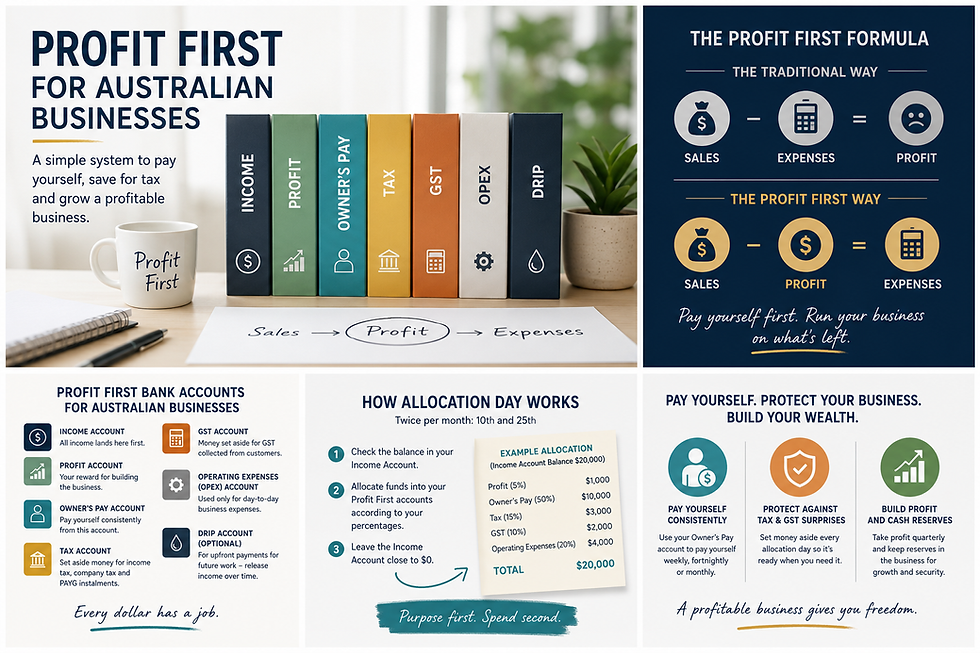
The five accounts are: Income, Profit, Owner's Pay, Tax, and Operating Expenses (OpEx). Each one has a specific job. Money flows into Income first, and twice a month, you distribute it across the other four accounts according to your allocation percentages.
The logic is simple: when every dollar has a designated home, you stop making spending decisions with money that was never yours to spend. Your Tax account, for example, holds the GST you've collected on behalf of the ATO. It was never business income, it was always the ATO's cut. Keeping it separate makes that reality visible.
Step 1: Choose Your Banks
Here's a practical tip that makes a real difference: open your Profit and Tax accounts at a different bank from your main operating account.
When profit and tax money sits in a separate institution, out of your everyday banking view, you're far less likely to dip into it during a tight week. Most Australian banks make it easy to open additional accounts online: Commonwealth Bank, ANZ, Westpac, and NAB all allow multiple business accounts under one login.
For your Income and OpEx accounts, your existing main business bank is fine. For Profit and Tax, consider a separate bank or a high-interest savings account at a different bank..
Step 2: Open the Five Accounts
You'll need five separate business transaction accounts. Contact your bank's business banking team or set them up via online banking. For each account, you'll typically need your ABN, ID, and business details.
Most Australian banks won't charge fees for additional business accounts, but it's worth checking your fee schedule. Some banks offer fee-free accounts for low-transaction accounts, perfect for your Profit and Tax accounts, which don't see much day-to-day activity.
Step 3: Name Each Account Clearly
This step seems small, but it matters enormously. Give each account a name that makes its purpose unmistakable:
Income - All Revenue In
Profit - Quarterly Distribution
Owner's Pay - My Wage
Tax - GST & Income Tax
Operating Expenses - Business Running Costs
When you see 'GST & Income Tax' in your banking app, you won't be tempted to use it for anything else. The name does the work.
Step 4: Set Up Your Allocation Percentages
Before you start transferring money, you need to decide on your Current Allocation Percentages (CAPs). These are the percentages that reflect where your business is right now, not where you want it to be eventually (those are your TAPs, or Target Allocation Percentages).
If you've never done this before, start conservatively:
Profit: 1- 5%
Owner's Pay: whatever you currently pay yourself
Tax: 15 - 20% (income tax)
OpEx: the remainder
You'll refine these as you run your first Instant Assessment and understand your real numbers.
Step 5: Set Your Allocation Days
Choose two dates per month for your allocations, the 10th and 25th are the most common. On these days, you transfer the current balance of your Income account across the other four accounts according to your percentages.
Put a recurring reminder in your calendar now. The rhythm is the foundation, miss a couple of allocation days and the habit starts to slip.
Step 6: Update Your Invoice Settings
All client payments and revenue should go directly into your Income account. Update your invoice template in Xero (or whatever software you use) to show your Income account bank details. This keeps the system clean from day one.
A Note on GST in the Tax Account
In Australia, if you're registered for GST, roughly 1/11th of your GST-inclusive revenue belongs to the ATO. Your Tax account should hold enough to cover your next BAS lodgement, plus your anticipated income tax liability.
a
A simple approach: allocate 15 – 20% of revenue to Tax. When BAS is due, use the Tax account to pay it. The money is already there. No panic, no scrambling, no paying the ATO from your operating account at the last minute.
You're Ready to Start
Five accounts, two allocation days a month, and a set of percentages. That's the entire mechanical structure of Profit First. The rest is just doing it consistently.
If you'd like help setting the right percentages for your business or want someone to walk you through your first Instant Assessment with you, I offer Profit First setup sessions as part of my services. Get in touch and we'll make sure you start on solid ground.
Key Takeaways
Open five accounts: Income, Profit, Owner's Pay, Tax, and Operating Expenses.
Put your Profit and Tax accounts at a separate bank to reduce the temptation to dip in.
Name the account clearly, the name acts as a psychological guardrail.
Set allocation the days (10th and 25th) and put them in your calendar now.
Allocate 15 – 20% to Tax to cover GST and income tax, no more BAS surprises.


Comments